Licensing
PVS Forge is licensed with a simple, honest model: you buy a permanent license for your PVS farm, and updates plus support come with a 12-month term. The License page in the app shows exactly where you stand and what your options are.
Editions
There are two editions, distinguished by how many PVS servers you run:
- Standard — for environments with up to two PVS servers.
- Growth — for environments with three or more PVS servers.
Permanent license, 12-month update term
This is the heart of the model:
- Your license never expires. PVS Forge keeps working — there is no license server, no call-home during operation, and no expiry lock in the app.
- Your update and support term runs for 12 months. Within that term you get new versions and manufacturer support. The current end date of your term is shown in the license portal.
- Builds released within your term keep running permanently, even after the term ends.
The renewal date is not a cut-off
When your update term ends, nothing stops working. You simply stop receiving new versions and support until you renew — whenever you choose to. The date is the ideal moment to renew, not a deadline that disables anything.
Activating a purchased license
A purchased license is bound to your PVS farm once, in a single offline
activation. After your purchase you receive an e-mail with your entitlement
code (format PVSF-XXXX-XXXX-XXXX) — not a key yet. The key is issued when
you activate:
- Create the activation file. Install PVS Forge on a PVS server of the
farm, open the License page and click Create activation file. This
saves a small file named
pvsforge-activation-<farm name>.pvsreq. It contains only your farm's identity (name, ID, server count) — no personal data. - Upload it in the license portal. Open
licensing.pvs-forge.com from any machine
with a browser, enter your entitlement code and upload the activation file.
You immediately receive your license key as a download (
.pvsilicfile) and by e-mail. - Activate in PVS Forge. Back on the License page, paste the key or load
the
.pvsilicfile — done. The key is valid on every PVS server of this farm.
Works without internet on the PVS server
The PVS server itself never needs internet access. The activation runs in your browser on any machine — carrying the activation file over on a USB stick is perfectly fine.
Uploading the same code and activation file again simply returns your existing key — for example if you closed the browser before downloading it.
One license per farm
The license is bound to the farm, not to a person or a single server:
- All PVS servers of the farm use the same key.
- A second farm needs a second license. This includes a disaster-recovery standby that is built as its own farm.
- Farm migrated or rebuilt? No problem — transfer the license to the new farm in the license portal (see below). A transfer replaces the binding: the previous farm is no longer licensed.
The license portal
The license portal is where you manage your licenses — no account and no password required. Enter the e-mail address used for the purchase and you receive a sign-in link (valid for 15 minutes). Signed in, you can:
- see all licenses of your address, their bound farm and the end date of the update term,
- re-download a key at any time, free and unlimited,
- transfer a license to a new farm: create the activation file on the new farm and upload it — you receive a new key for the new farm.
Use a functional mailbox
Purchase and manage licenses with a functional mailbox (for example
it-licenses@example.com) rather than a personal address — then portal
access never depends on a single person.
If the purchase mailbox no longer exists, contact support@pvs-forge.com. Have either your Paddle order number or your license ID and farm GUID ready — the License page copies exactly this pair via Copy support info.
What the License page shows
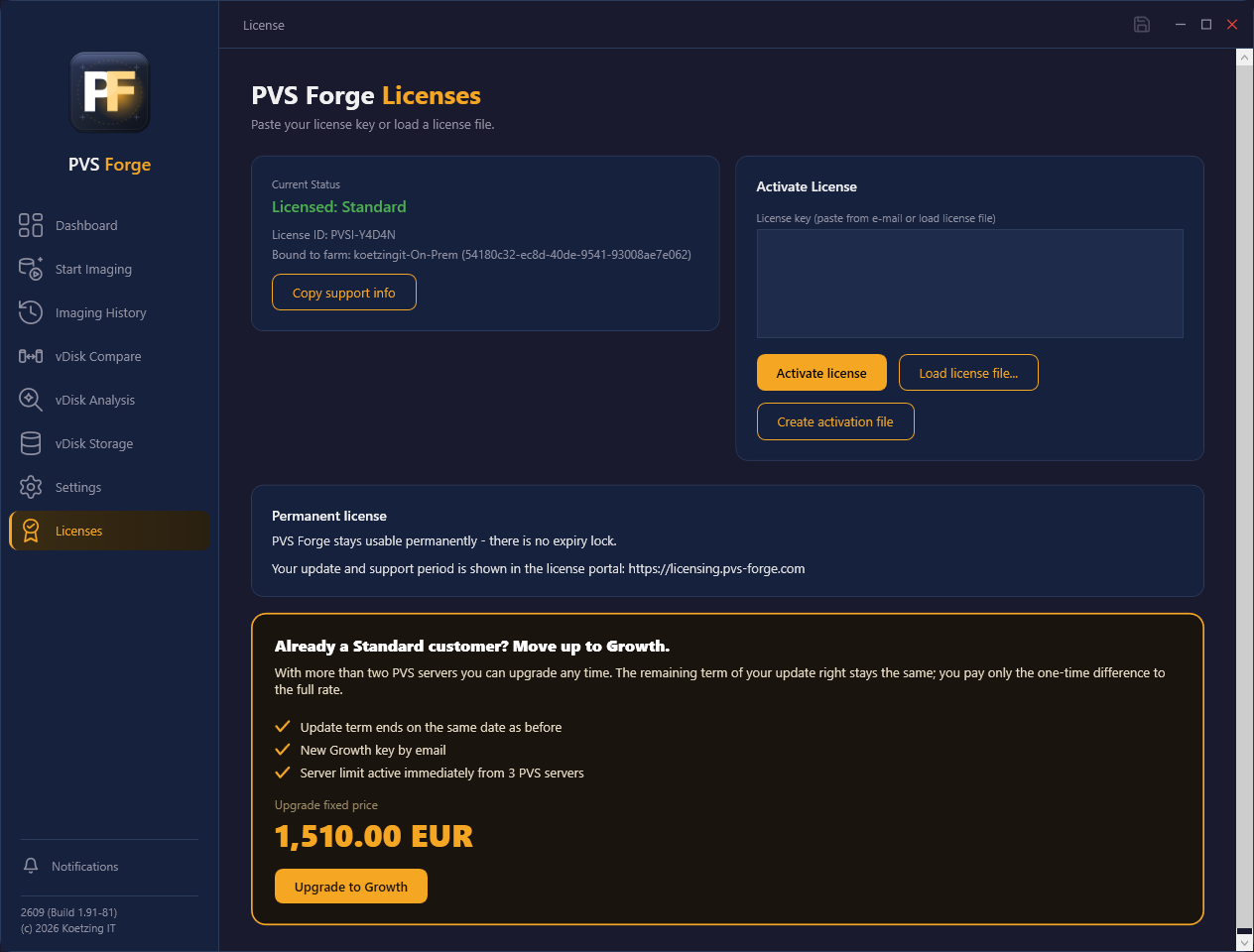
Open License in the app to see your current status:
- For an activated license: the edition, your license ID and the bound farm (name and ID), plus a "Permanent license" note. The end date of your update term is shown in the license portal.
- For Growth, a short thank-you and a note that renewing also unlocks features of upcoming products.
- Before you buy (or during a trial): the pricing overview with both editions.
- Not activated yet: a short three-step guide to the activation described above.
Renewing the update term
Renewing works like a purchase: you receive a new entitlement code and activate it on your farm — the new license replaces the previous one automatically.
- If you renew before your term ends, the new 12 months start at your current end date. Nothing is lost by renewing early.
- If you renew later, the new 12 months start at the purchase date.
Upgrading from Standard to Growth
If you started on Standard and grew past two PVS servers, you can move up to Growth at any time. PVS Forge shows an upgrade panel on the License page:
- Your update term keeps the same end date — the upgrade does not shorten or reset it.
- You pay a one-time upgrade fixed price — the difference to the full Growth rate, not a second full purchase (see the pricing page for the amount).
- You receive a new Growth key by e-mail, already bound to your farm — no new activation file needed. Paste it on the License page and the higher server limit is active immediately.
The Upgrade to Growth button opens the pricing page to complete the upgrade.
Trial
A trial gives you the full Growth feature set for 30 days. The trial key arrives directly by e-mail (no activation file needed) and is bound to the first machine it is activated on. During a trial the License page shows both purchase options, exactly as before a purchase.